← All projects

Project 03 · Product prototype · Healthcare digitalization concept · 2026

Reha

A digital rehabilitation experience designed from the patient journey outward.

Rehabilitation is weeks of therapies, appointments, rooms, documents, meals and small daily decisions, held together mostly on paper. After experiencing that workflow first-hand, I modelled it, designed a connected weekly plan for patients and clinic teams, and built a working prototype, RehaConnect, that I later proposed to rehabilitation organizations.

Prototype, not a product in use. Built with test data, demonstrated locally, presented as a concept. It was never deployed in live clinical operation and never used by real patients or staff.
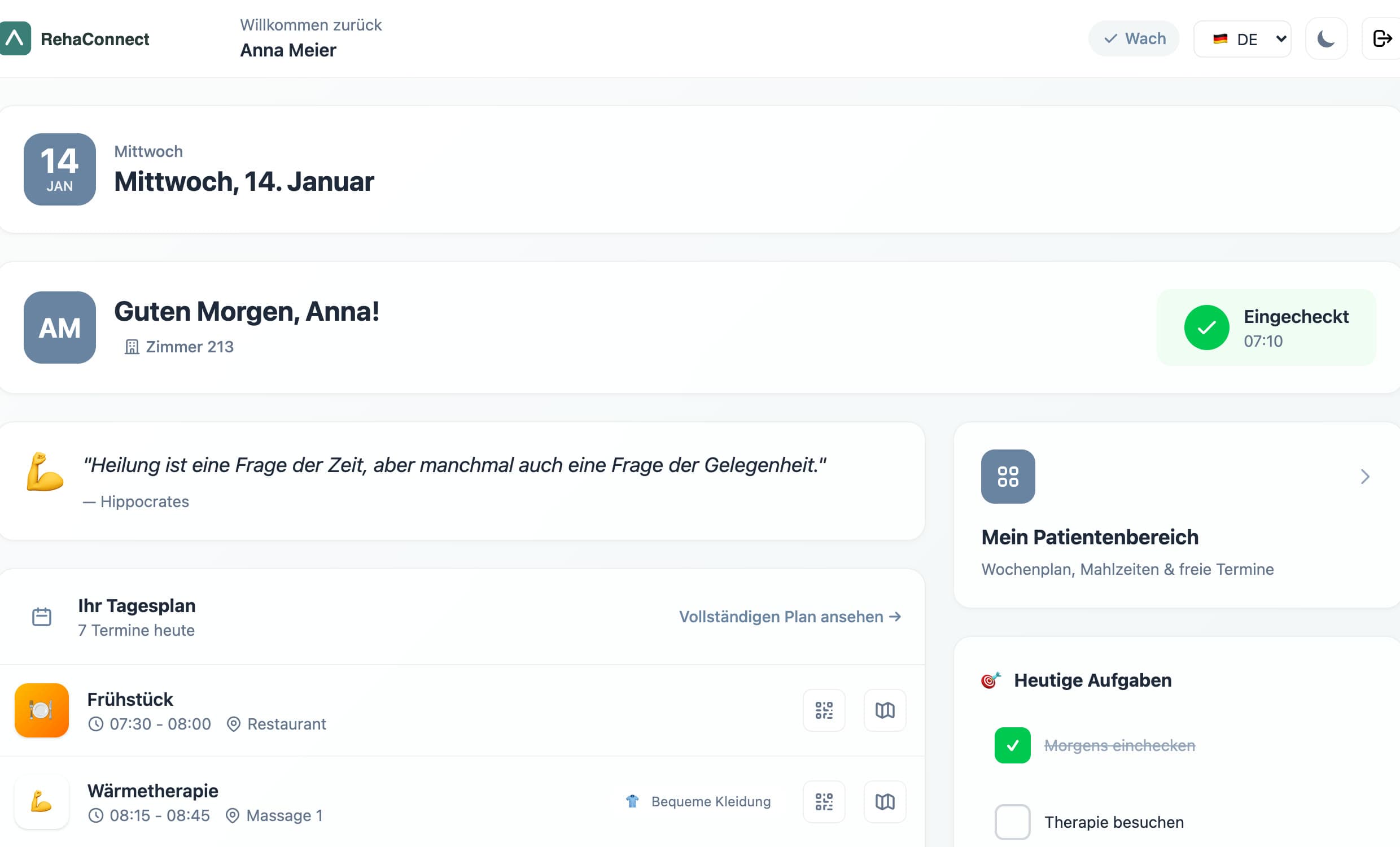
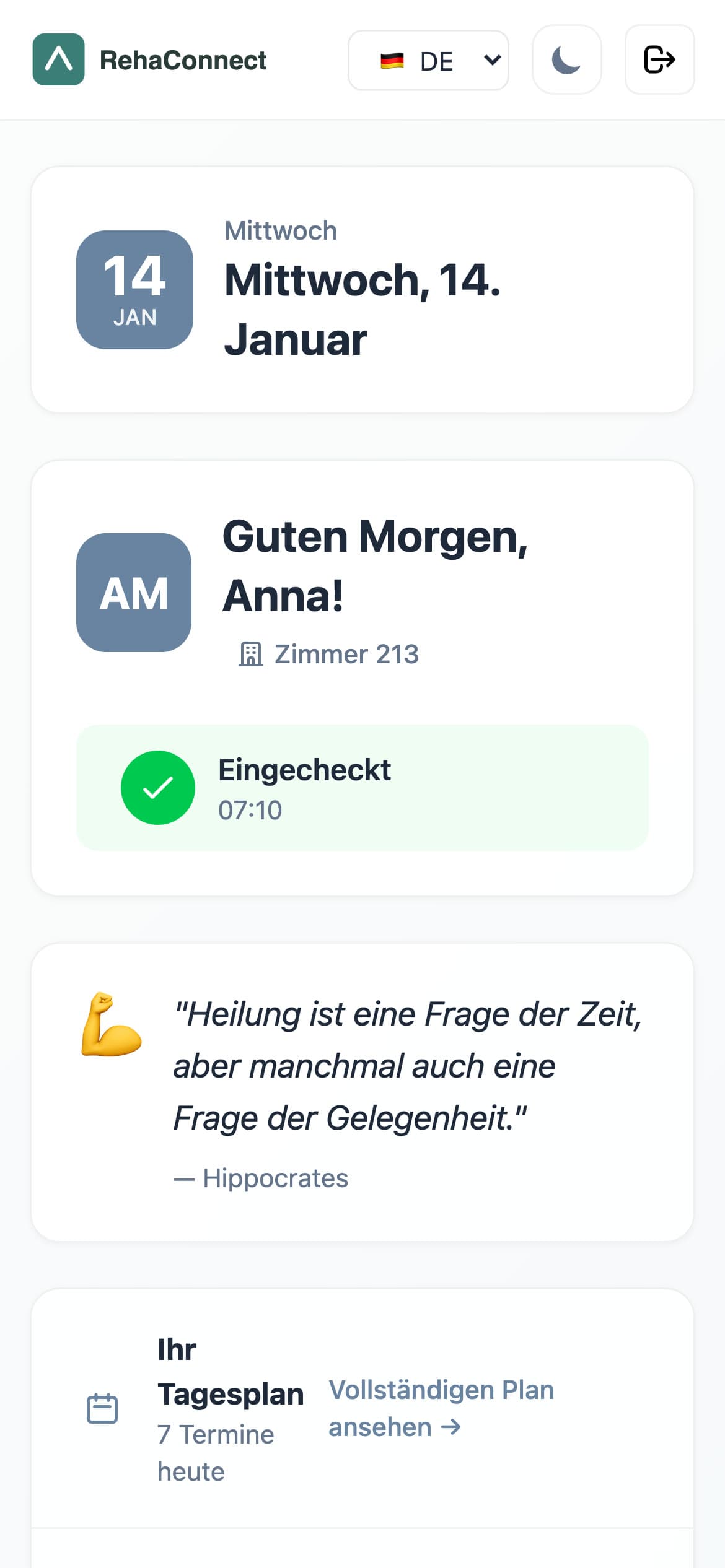
Patient dashboard on a Wednesday in January: greeting, checked-in status, seven sessions of the day with room and clothing notes, today's tasks and quick overview.
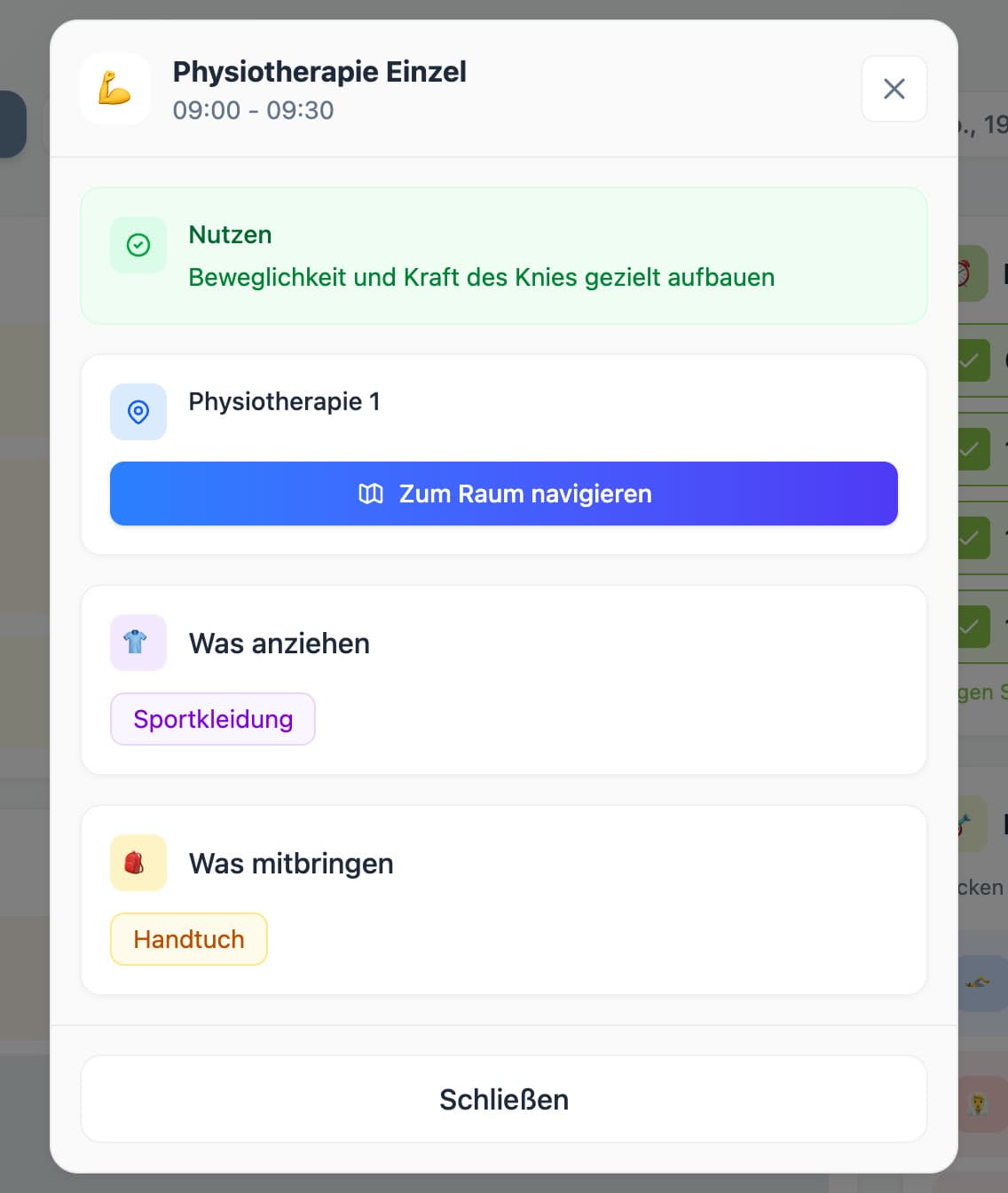
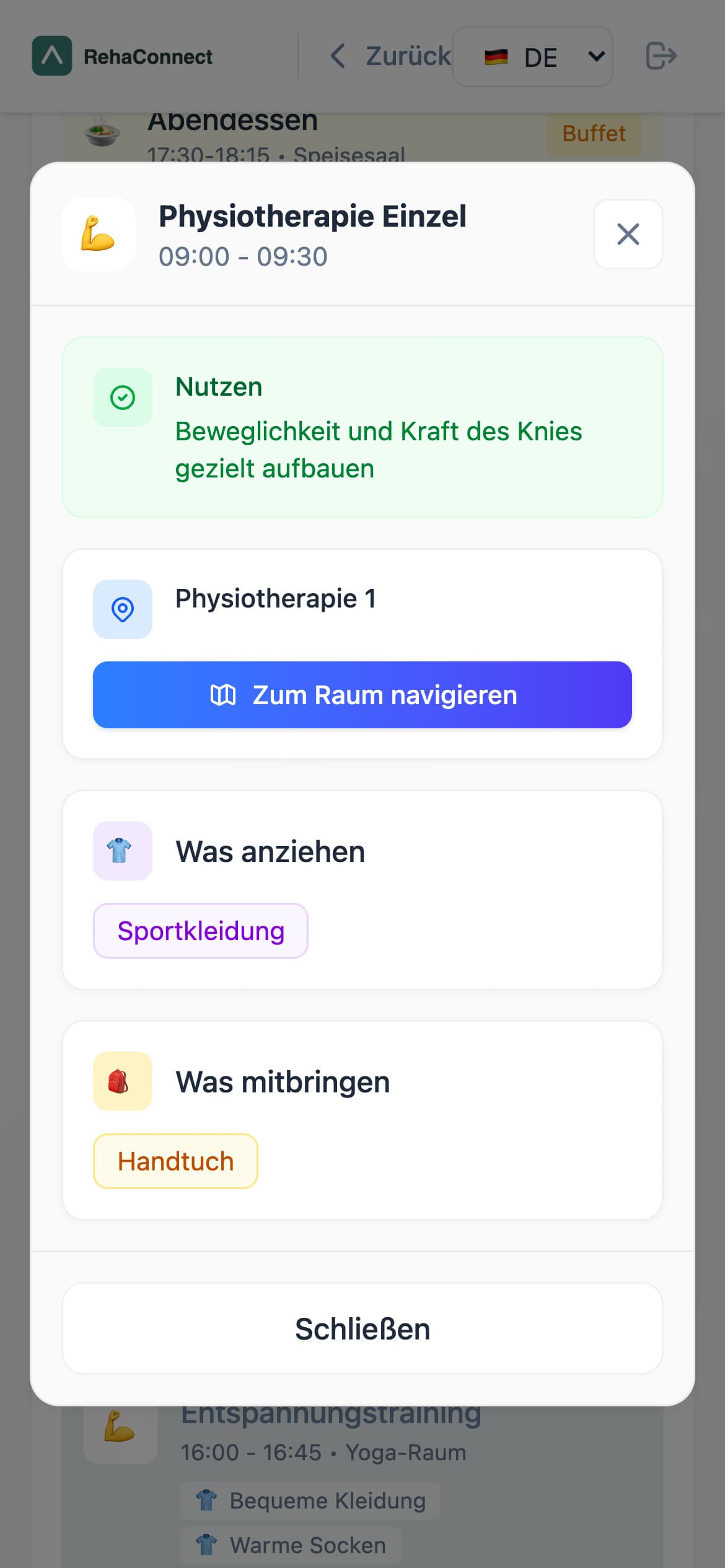
Phone view of a session detail: Physiotherapie Einzel 09:00 to 09:30, benefit, room with navigation button, what to wear, what to bring.
Session detail on a phone

01 · The experience

A rehabilitation stay is many moments that have to fit together.

Over three weeks a patient moves through a dense program: therapies, medical consultations, group training, meals, free-time offers, documents and goals, spread over rooms and floors, with a plan that changes at short notice. From the inside, the stay is not a medical process. It is a schedule you have to keep up with.

  • Therapies
  • Appointments
  • Documents
  • Assessments
  • Goals
  • Meals
  • Free-time offers
  • Rooms and floors
  • Communication
  • Progress

02 · The problem

The same information is needed by everyone, and it lives on paper.

Patient view

  • Most information exists only on paper
  • Therapy plans change at short notice
  • Orientation is hard: which room, which floor?
  • Uncertainty: what do I need, what do I wear?
  • Hardly any overview of the whole week

Therapists and staff

  • High organizational effort
  • Plans must be adjusted frequently
  • Heavy coordination at full occupancy
  • Attendance lists and documentation on paper
  • Little time for individual patient questions

Observations recorded during the stay from both sides, patients and staff, and used as the starting point of the concept.

03 · The product idea

One connected weekly plan, seen from each role.

The concept maps every observed friction to one digital answer, and keeps the patient day as the centre of the system.

Observation in daily routineIdea for a digital solution
Therapy plans change frequentlyA digital, always-current weekly plan
Patients keep asking where a room isRoom and floor shown on every session, with a navigation map
Uncertainty about clothing and materialWhat to wear and what to bring, per session
Free time is hard to planOverview of free slots and optional offers
A lot of paperDigital information instead of printouts
  1. 01Rehabilitation stay
  2. 02Weekly plan
  3. 03Session: room, wear, bring
  4. 04Orientation
  5. 05Check-in and attendance
  6. 06Therapist day view
  7. 07Clinic overview
PatientsMore orientation, a plannable week, fewer open questions.
TherapistsFewer questions to answer, less organizational effort.
AdministrationLess paper, a clearer overview of the house.

04 · How it works

Three roles, one day.

Patient

My day and my week: sessions with room, what to wear and what to bring, morning check-in, meals, free-time offers, goals, documents, news and a navigation map.

Most complete; several parts are UI over static data.

Therapist

Today's sessions with participants, QR scanning for attendance, updates from the clinic, cabin occupancy and a facility map.

Schedule and cabins are static data; attendance stays in the browser.

Administration

Patient list and creation through the API, patient detail with a printable QR login, plus a dashboard for stations, therapy plans, meals, rooms and analytics.

Patient CRUD is real; the dashboard is mock data.
Real backendBrowser stateStatic data
  • Patient logs inby code or QR; the ID is verified against the API
  • Morning check-in“How do you feel today?” is posted to the check-in endpoint
  • Weekly plan and day viewsessions with room, wear, bring and benefit from the schedule data
  • Orientation“Navigate to room” opens the floor plan
  • Meals, goals, free slotschosen and locked in the browser
  • Therapist scans the session QRattendance is recorded in the browser; the API endpoint exists but is not wired
  • Administration creates patientsthrough the API, with a printable QR login

05 · Patient experience

My day, my week, and what I need for the next session.

Phone dashboard: date card, greeting with room number and checked-in state.
Today
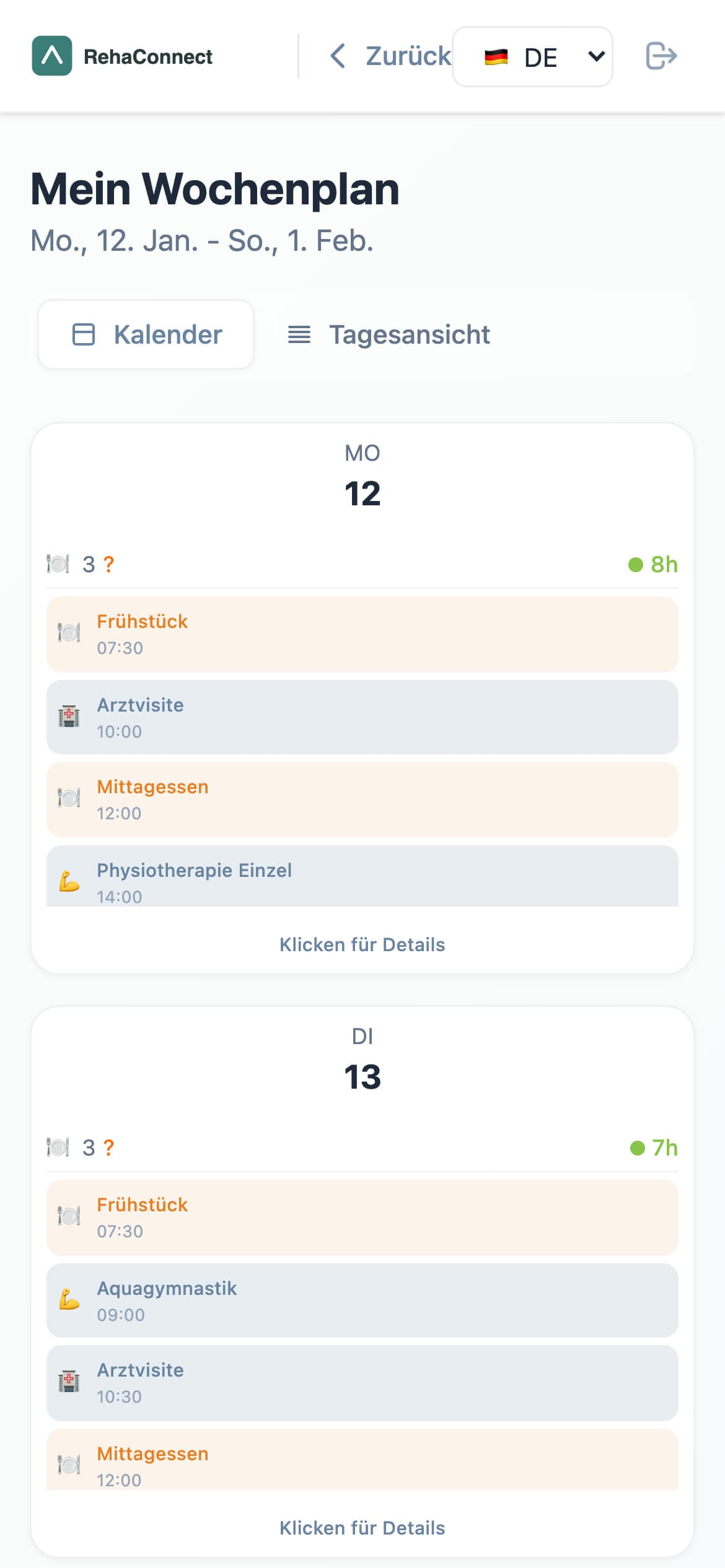
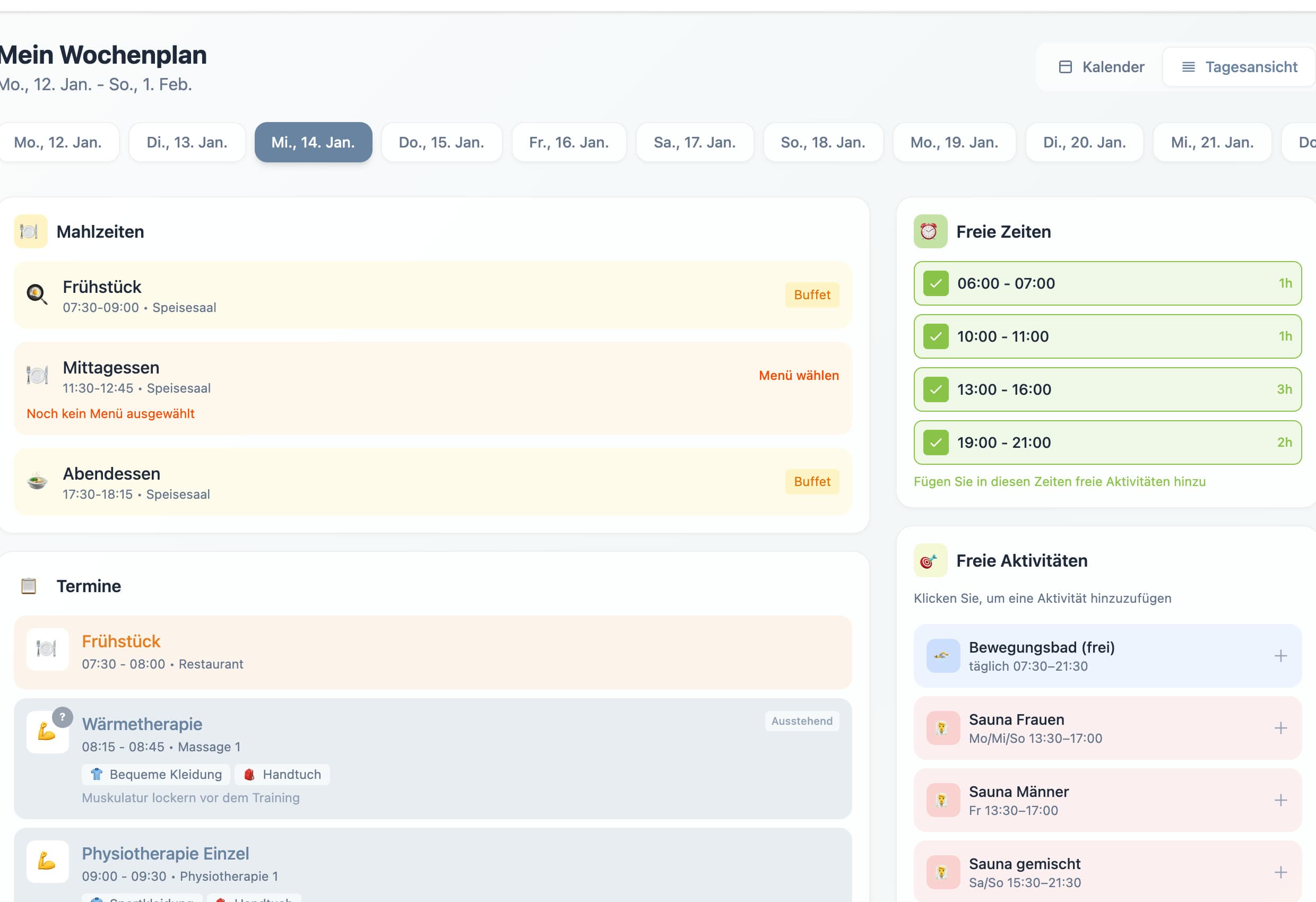
Phone weekly plan: calendar and day-view toggle with the days of the stay.
Weekly plan
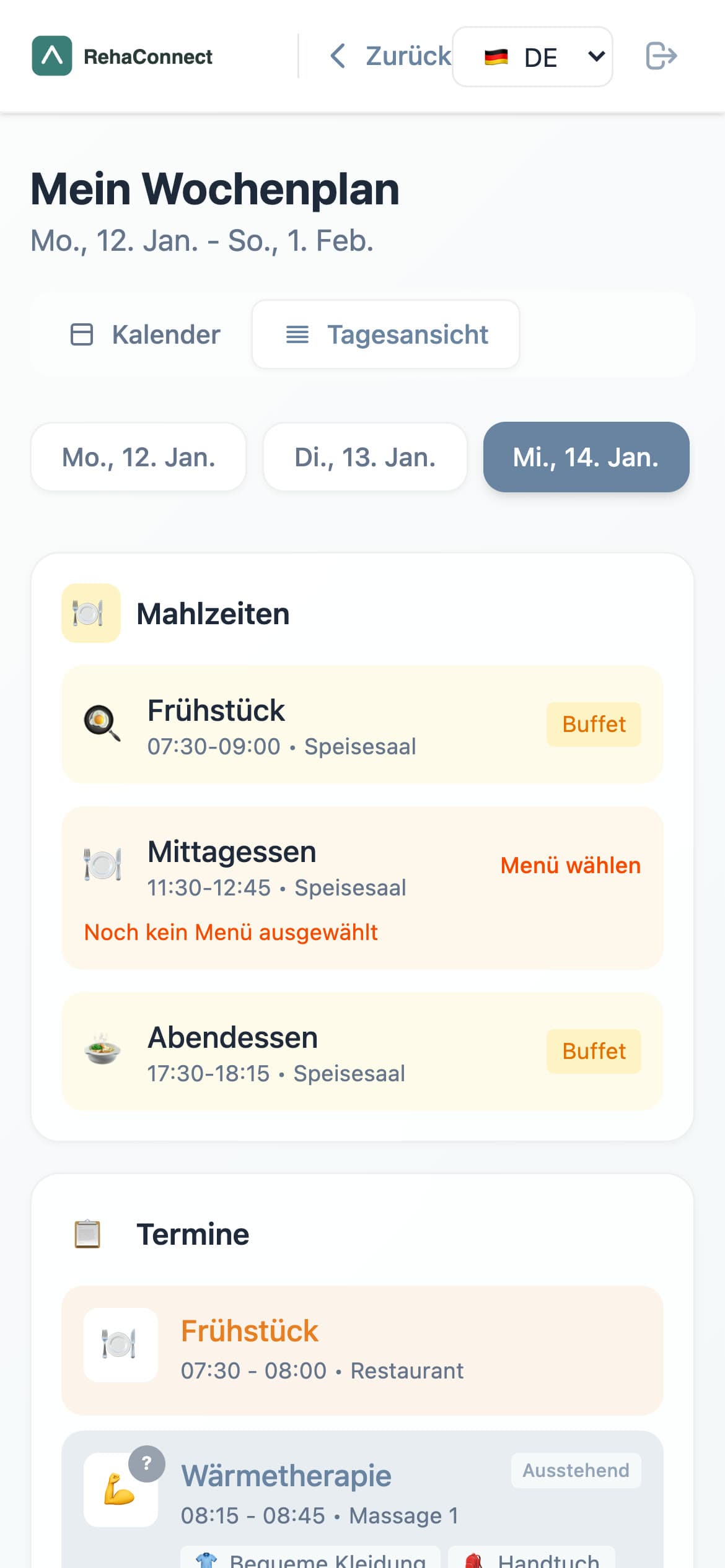
Phone day view of the weekly plan with meals, sessions and free slots.
Day view
Phone session detail with benefit, room navigation, what to wear and what to bring.
Session detail
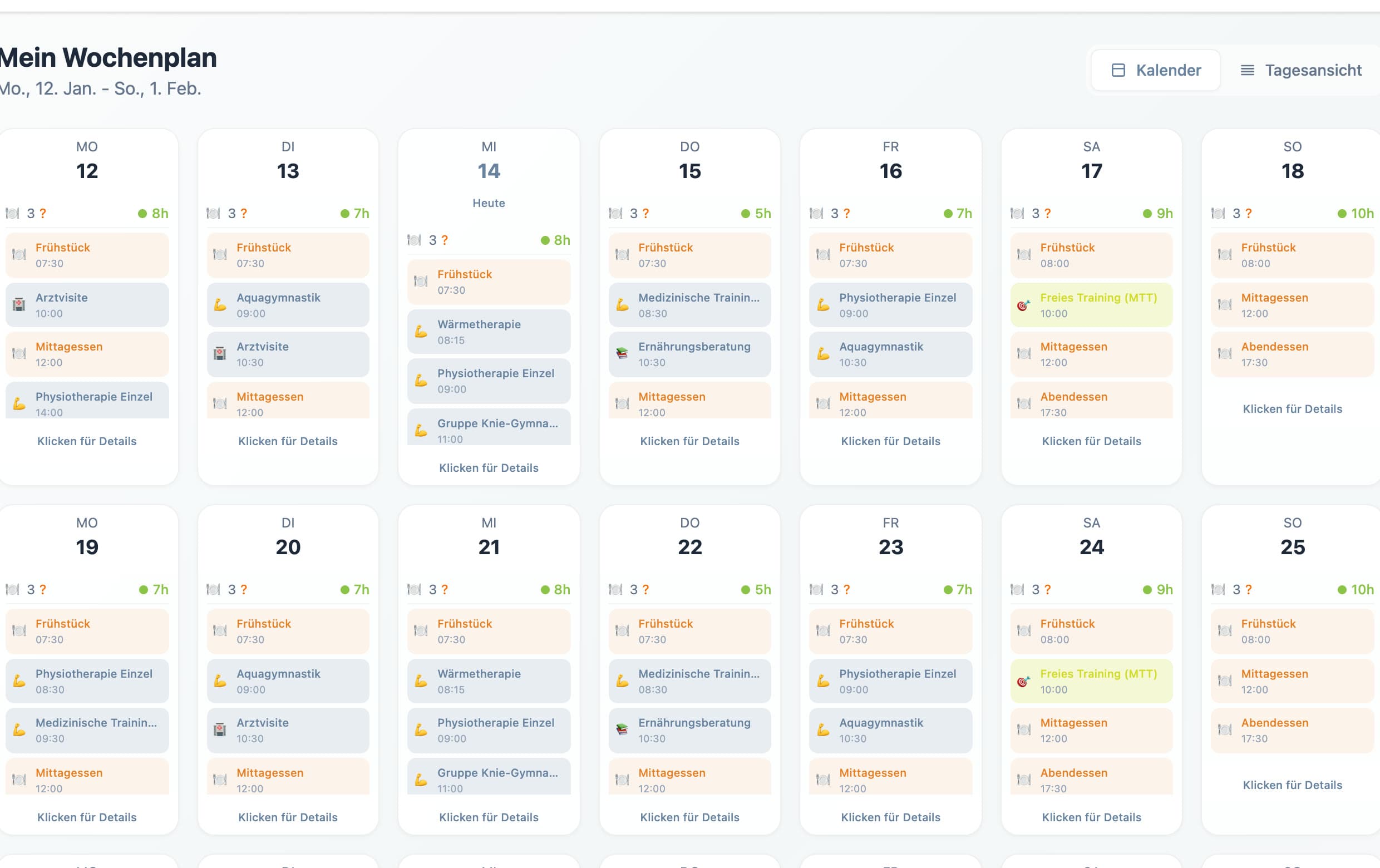
Weekly plan: three weeks of days in a grid, each day listing meals, therapies and lectures with times and an hours total.
Day view: meals, appointments with clothing and equipment hints, free slots and free-time activities for one day.
Session detail card: Physiotherapie Einzel 09:00 to 09:30, benefit, room Physiotherapie 1 with a navigate-to-room button, what to wear: sports clothes, what to bring: towel.

The core idea

What to wear, what to bring, where to go.

Every session carries its room, a benefit line, a clothing list and an equipment list. On the backend these are validated fields on the schedule record, not free text. It answers the question a patient actually has at 08:45: what do I need for the 09:00 session and how do I get there.

Also in the patient space: weekly menu choice with a lock deadline, weight goal with BMI range, free-time booking, course documents by diagnosis, clinic news and a floor map. These run on static data and browser state.

06 · Clinic experience
The same day from the therapist’s and the clinic’s side.

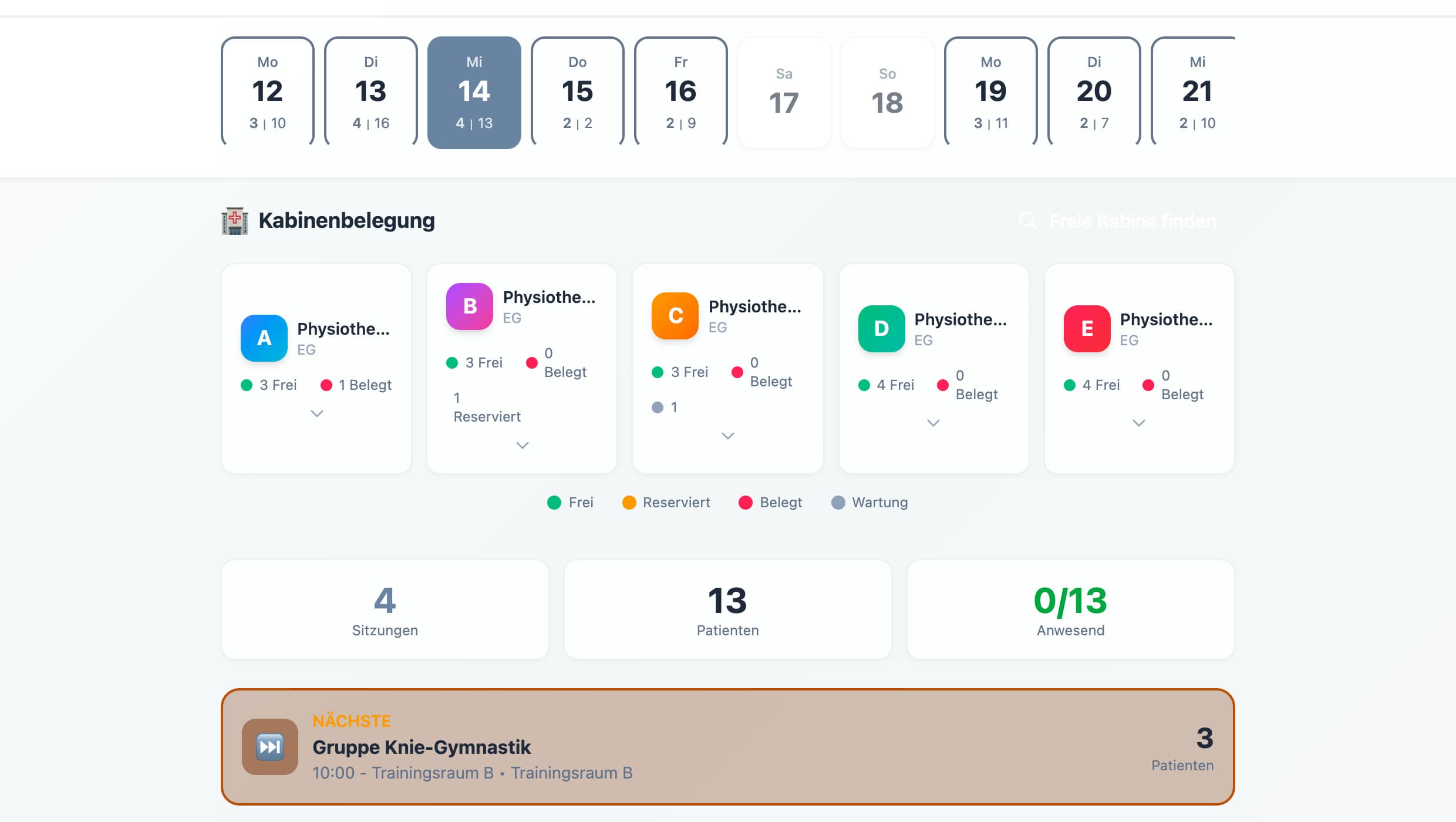
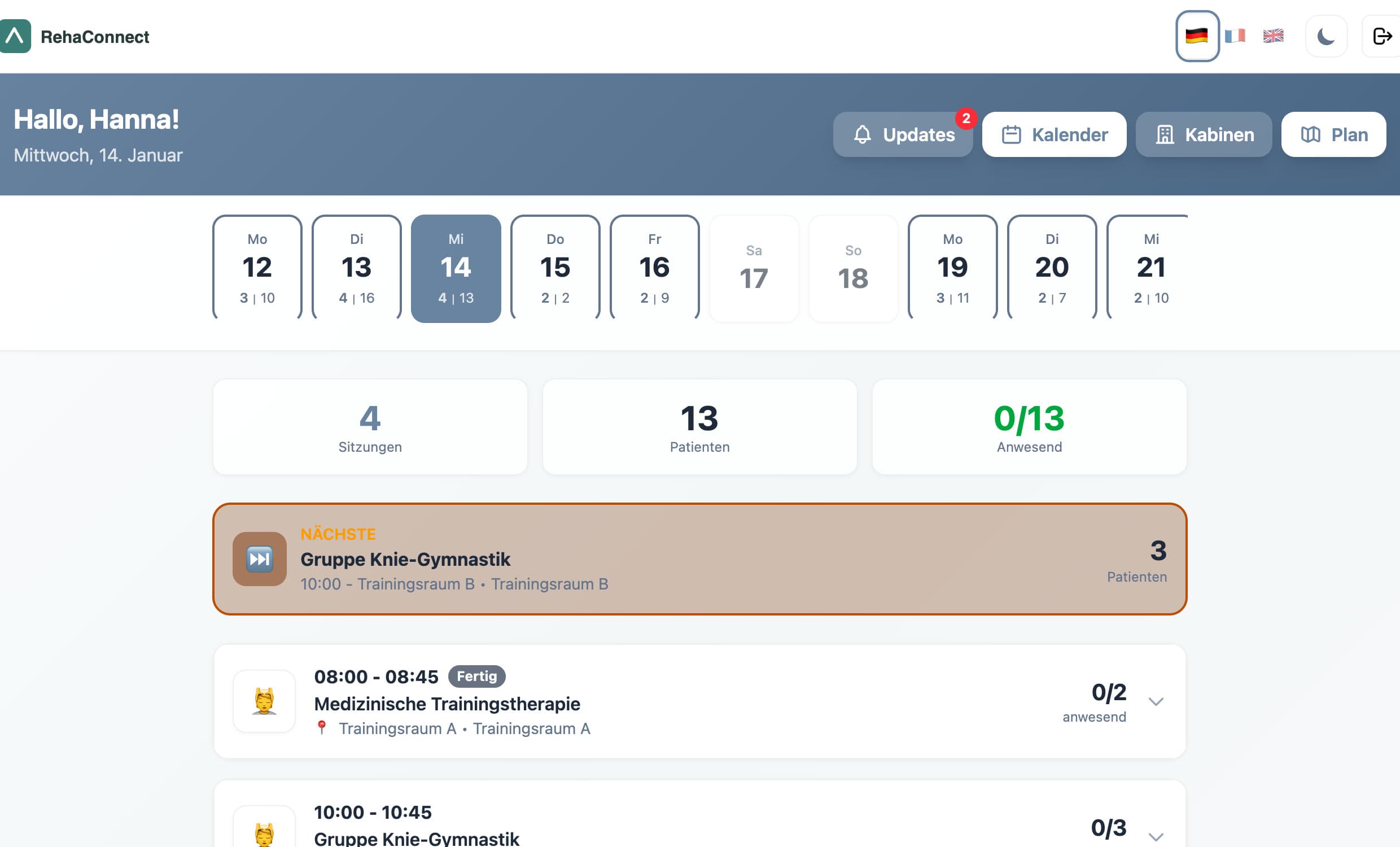
Therapist dashboard: greeting, day strip with sessions and patients per day, counters for sessions, patients and attendance, and the session list of the day.
Cabin occupancy: five physiotherapy areas with free, reserved and occupied cabins.
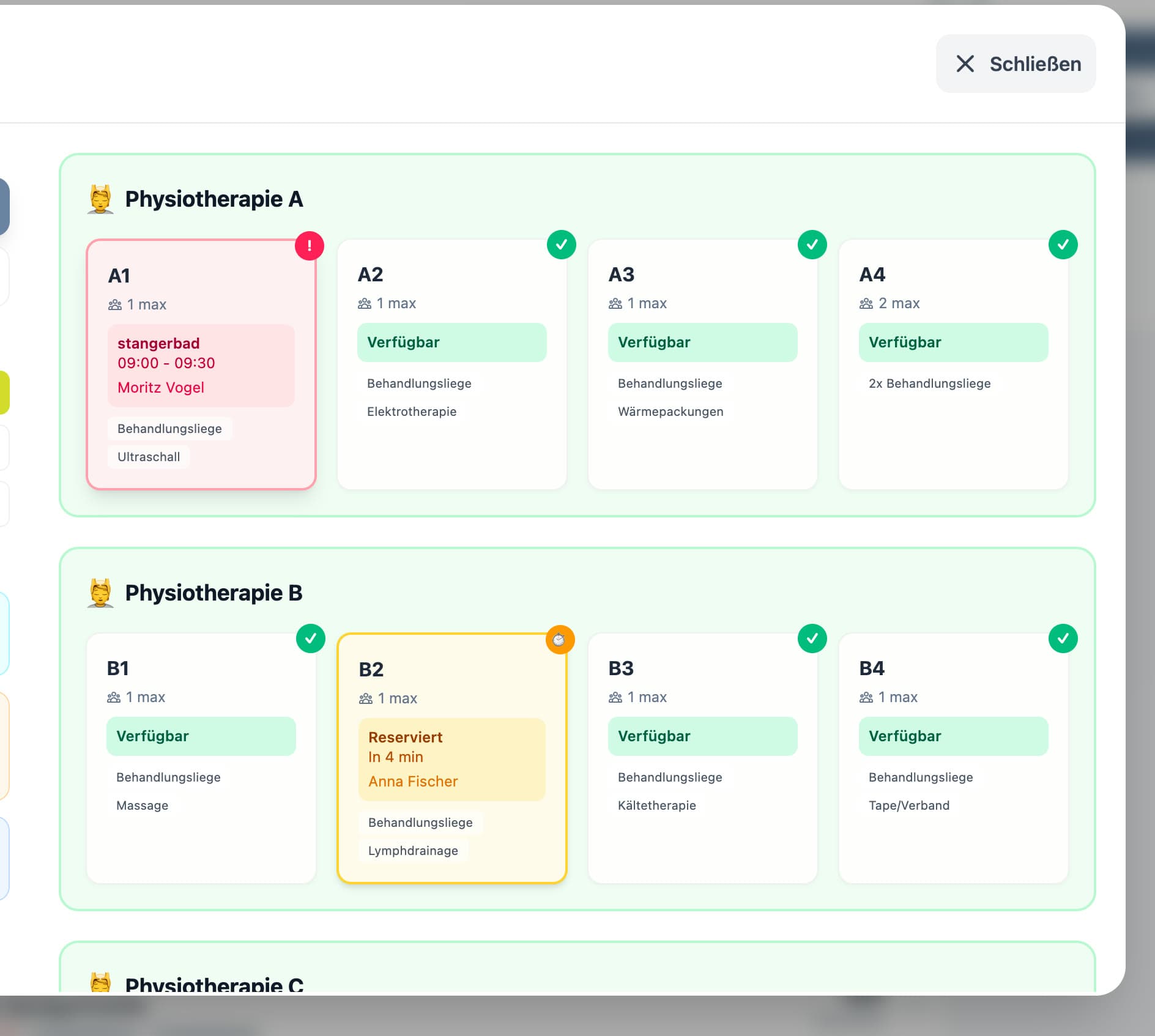
Facility map modal: building and floor selection, physiotherapy areas A and B with cabin cards showing free, occupied and reserved states.

Orientation for both sides

Rooms, cabins and floors as a shared map.

Patients get a route to their room from the session detail; therapists see which cabin is free, reserved or occupied right now. Both views read the same room and cabin model.
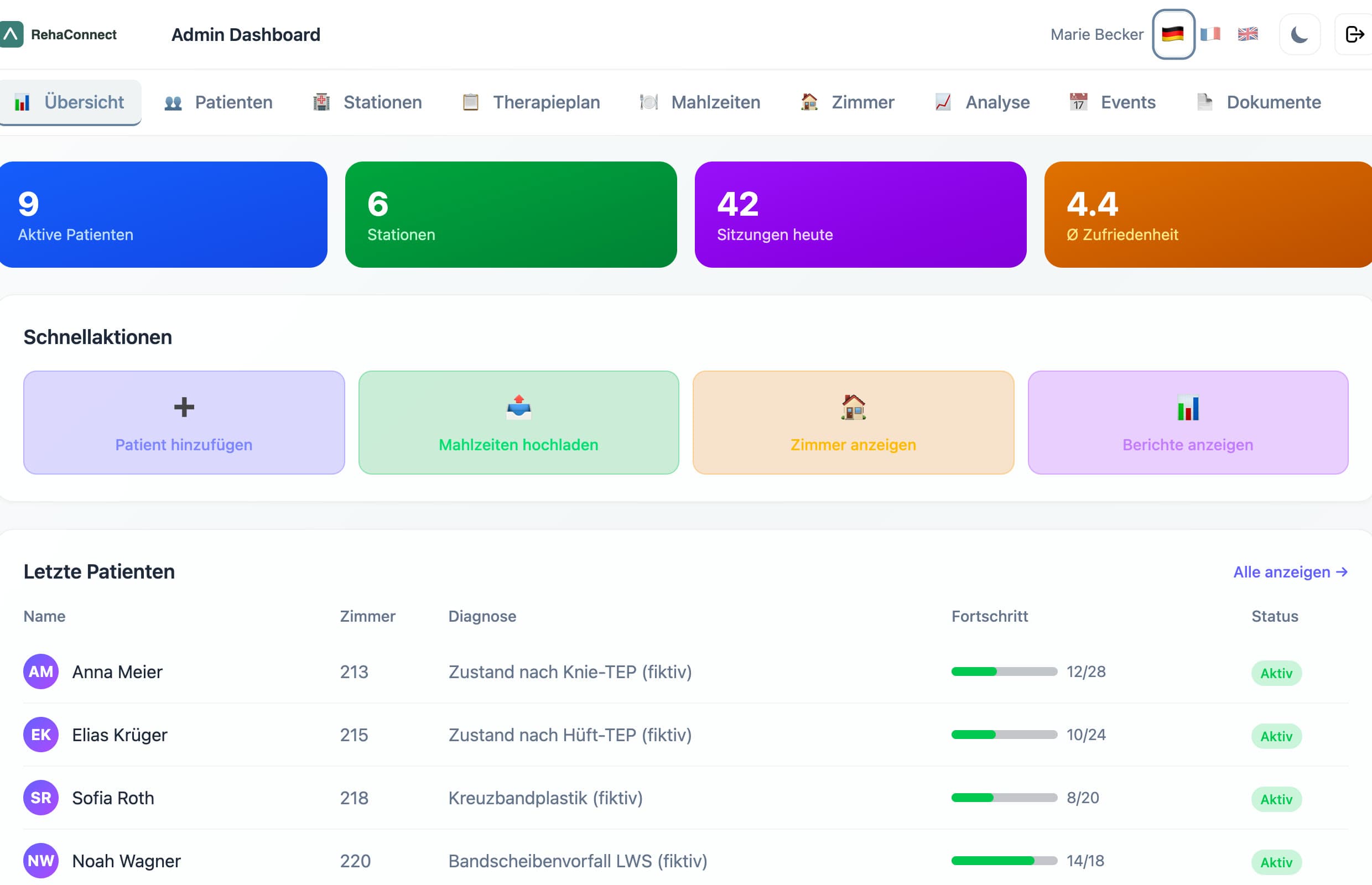
Admin overview: active patients, stations, sessions today, satisfaction, quick actions and a recent patients table with synthetic names and diagnoses.
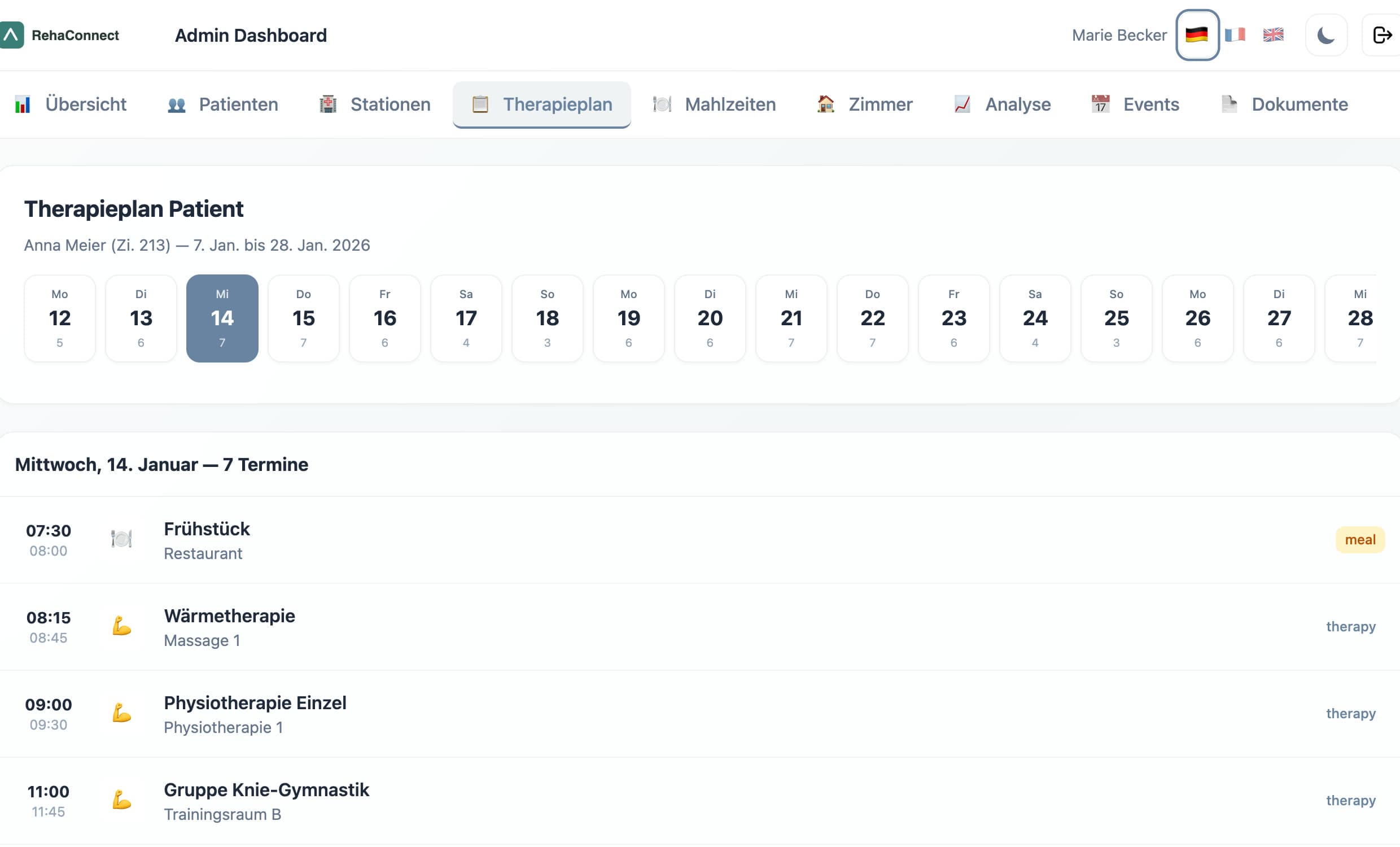
Admin therapy plan for one patient: a day strip and the list of the day's appointments.
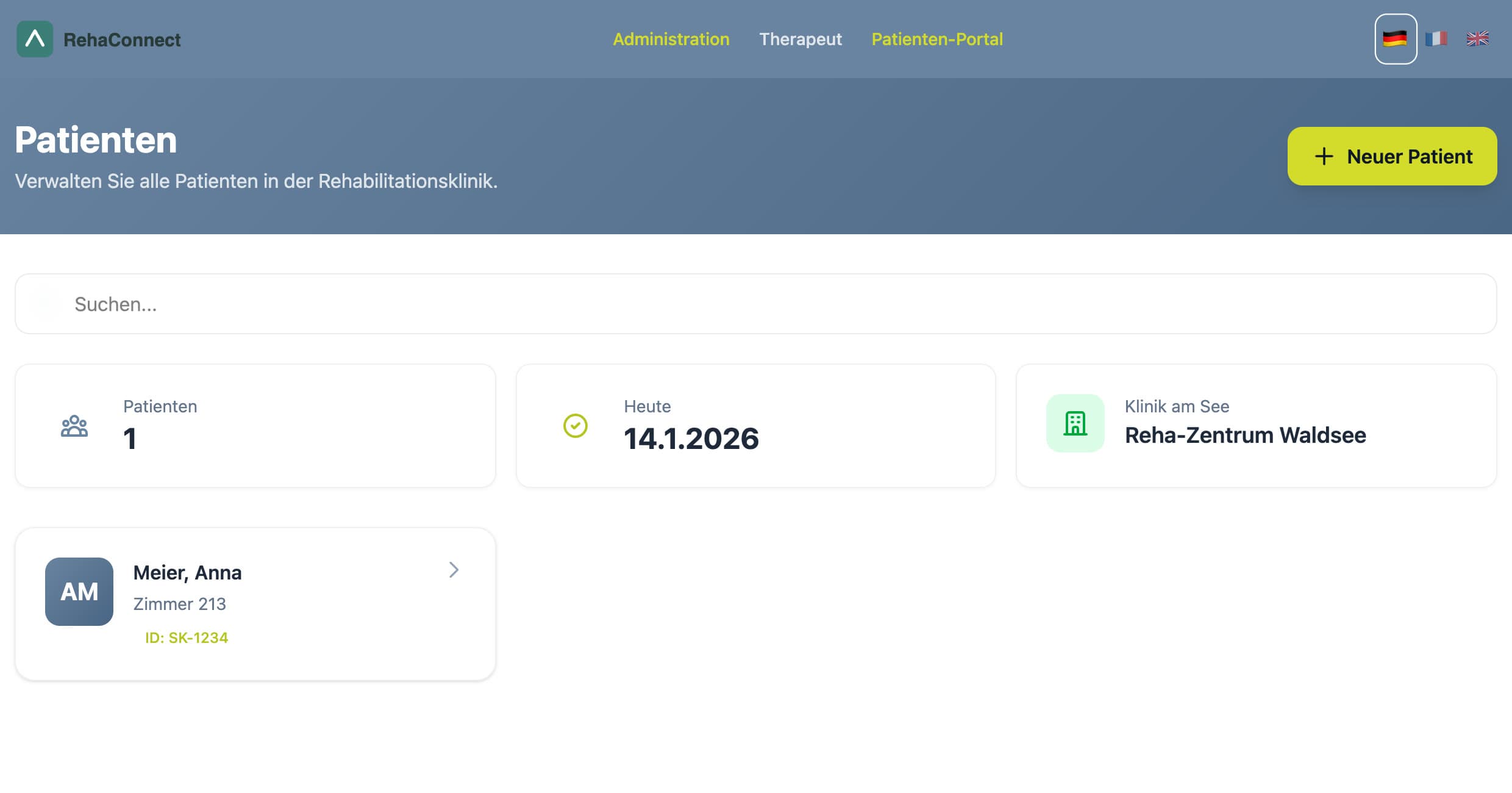
Patients page backed by the API: search, patient count, today's date and a patient card with room and ID.

07 · Data and system model

The stay as a domain, not a set of screens.

Four entities are persisted by the backend; the rest of the domain is typed on the frontend and fed from static fixtures. The split is exactly where prototype ends and product would begin.

Persisted by the API

Patientid · room · first name · last name · date of birth
SchedulepatientId · date · start · end · type · room · bring · wear · notes
AttendancescheduleId · patientId · date · status (present / absent / late / cancelled) · checkInTime
CheckinpatientId · date · time · type (awake / ready / arrived)

Typed, static fixtures

PatientProfilestay dates · duration · goals · documents · primary therapist · case manager
ScheduleSessiontitle · location · type · wear[] · bring[] · benefit · documents
FreeSessiondurations · available slots · what to wear · location
MealOption / DayLunchtwo menus per day · allergens · calories · locked with reason
PhysioCabin / CabinBookingarea · supported therapies · equipment · capacity · status
ClinicConfigname · colours · contact · features · gallery (white-label)

Relationships: Schedule, Attendance and Checkin reference a Patient; Attendance references a Schedule. Around ninety TypeScript interfaces describe the frontend domain, compiled under strict mode.

08 · Engineering

Prototype engineering, stated plainly.

Frontend
React 18, TypeScript (strict), Vite 5, Tailwind CSS 4, React Router, i18next with German, English and French at full key parity, qrcode.react and html5-qrcode
Backend
Node.js with Express 4 and CORS; 11 routes; hand-written validation; a JSON-file store with atomic temp-file writes
Roles
Patient, therapist, administration: three entry points, each with its own view of the same day
State
Session per role in sessionStorage; meals, goals, bookings and therapist attendance in localStorage; three write paths reach the server
Tests, CI, deployment
None. The project has no test suite, no pipeline and no deployment configuration

API surface

  • GET /api/patients
  • GET /api/patients/:id
  • POST /api/patients
  • GET /api/schedules
  • GET /api/schedules/:id
  • POST /api/schedules (conflict check)
  • GET /api/attendance
  • POST /api/attendance (upsert)
  • GET /api/checkin
  • POST /api/checkin (once per day and type)
  • GET /api/health

Prototype versus production readiness

AreaIn the prototypeRequired before clinical use
AuthenticationCode lookup against a served JSON file; patient ID is the credentialReal identity, sessions, roles and consent
PersistenceJSON files on disk, no locking; most state in the browserA database with migrations, backups and tenancy
Data protectionNo encryption, no audit log, no retention rulesGDPR processes, audit trail, deletion and access rights
IntegrationFixture data; no clinic systems connectedInterfaces to planning, HIS and documentation systems
RegulatoryNot assessedMedical-device classification review, security review, accessibility
Clinical validationNone; never used by patients or staffPilot with clinical stakeholders, measured outcomes

09 · From experience to prototype

Observe, model, design, build, propose.

  1. Experienced

    Daily participation in a rehabilitation program; conversations with other patients, therapists and staff; watching the routines.

  2. Observed

    Paper plans, short-notice changes, orientation problems, clothing uncertainty, no weekly overview; high coordination load for staff.

  3. Modelled

    The stay as patients, sessions, attendance, check-ins, meals, cabins and rooms, with wear and bring on every session.

  4. Designed

    A patient-first weekly plan with a day view, and role views for therapists and administration on the same data.

  5. Built

    RehaConnect in January 2026, in evenings and on weekends, with test data only, as a working local prototype.

  6. Proposed

    Presented as a digitalization concept to rehabilitation organizations, framed for the DRV model-project route with the clinic as applicant.

10 · What happened next

A concept on the table, not a system in a clinic.

The concept was proposed to rehabilitation organizations. It did not move into production deployment, and the prototype was never used in clinical operation.

That is the normal shape of healthcare digitalization. Building the software is one part. Adoption also needs institutional capacity, a funding and procurement route, integration with existing clinic systems, regulatory and security review, organizational change and alignment with clinical stakeholders. None of those are solved by a prototype, however complete it looks.

11 · What I learned

  • Model the domain before the UIThe most useful idea in the prototype is a data field: wear and bring on every session. Once the domain carried it, every screen could show it.
  • Design from the patient day outwardThe plan that matters is Wednesday at 09:00 in Physiotherapie 1 with sports clothes and a towel, not a hospital information system.
  • Two perspectives on one schedulePatients and therapists look at the same session from opposite sides: where do I go, versus who is here. The prototype gives each side its own view of shared data.
  • Workflow state is the productCheck-ins, attendance, locked meal choices and booked slots are states, not screens. The prototype models them, but keeps most of them in the browser; the real work is moving them behind an API.
  • Privacy shapes the architectureA rehab plan is health data. Anything beyond a prototype starts with identity, consent, audit and retention, not with features.
  • Adoption is its own systemA clinic adopts through funding routes, procurement, IT review and staff time. Software readiness is necessary, not sufficient.

Truth table

Built, proposed, demonstrated, production.

Built
Three role views, a patient weekly plan with wear/bring per session, QR login and attendance, morning check-in, meals, free-time offers, goals, news, documents, navigation map, cabin occupancy, admin dashboard, an Express API with a JSON store, three languages.
Proposed
Digital support for the daily rehab routine, funded through a DRV model project with the clinic as applicant and my company as technical partner. Server-side attendance, real accounts, clinic integration and hosting were concept only.
Demonstrated
Everything on this page runs locally on synthetic data: patient, therapist and admin journeys end to end, patient creation through the API, QR generation, attendance and check-in endpoints.
Production
Never deployed in live clinical operation. Never used by real patients or staff. Not clinically validated, not certified, not assessed for medical-device or data-protection compliance.

All screenshots on this page come from the prototype running locally on a fully synthetic dataset (fictional patient “Anna Meier”, fictional clinic “Reha-Zentrum Waldsee”). No clinic, patient or staff member is identified.

Next

Three projects, one practice.